
Diablo II: Resurrected Character Editor (D2CE)
The gold standard for offline character modification. D2CE is a powerful, open-source C++ utility designed to provide complete control over your D2R Single Player experience. 100% Offline. 100% Secure.
* Supports standard .d2s save formats and major community Mods.
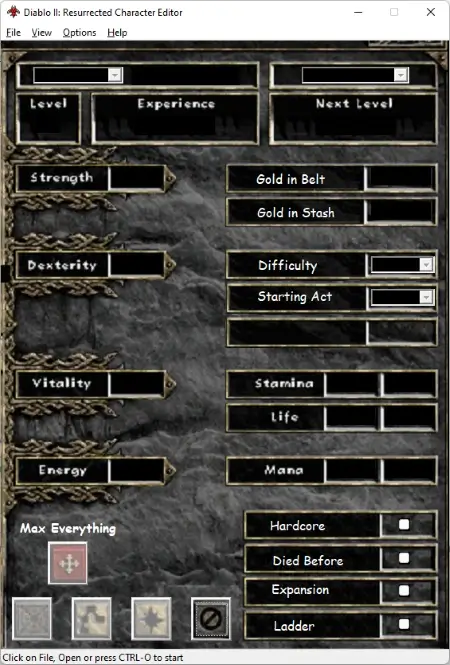
The Power of Local Modification
D2CE is built for the purist who demands reliability. Unlike web-based tools, D2CE runs locally on your machine, ensuring your character data remains private and your edits are instantaneous.
Stats & Attributes
- Stat Management: Precisely edit Strength, Dexterity, Vitality, and Energy points.
- Leveling Control: Modify character level and experience values to test specific builds.
- Gold Limits: Adjust gold in your inventory and stash (supports v1.13c+ limits).
- Progression: Reset or advance character titles and difficulty unlocks.
Item & Gear Editing
- Item Creation: Use the dedicated form to generate any base item, unique, or set.
- Socketing: Add sockets to gear or apply runewords with a single click.
- Enhanced Quality: Toggle Ethereal, Indestructible, or Superior item states.
- Item Portability: Export items as .d2i files or import curated item packs.
World & Mercenary
- Waypoint Unlocker: Instantly unlock waypoints for all acts across all difficulties.
- Quest Editor: Complete specific quests to get rewards like skill points or resistances.
- Mercenary Support: Edit your mercenary’s stats and gear slots (updated for D2R).
- Shared Stash: Access and modify items in your account’s shared storage tabs.
Stability & Mods
- Mod Compatibility: Native support for D2R mods like BTDiablo and Rebirth.
- Save Backups: Built-in safety features to detect and restore corrupted files.
- UTF-8 Support: Handles international character names and localized data files.
- Classic Support: Fully compatible with legacy Diablo II (v1.14d) save files.
How D2CE Interacts with Your Save Files
Understanding the mechanics of the .d2s file format is crucial for successful character modification. D2CE acts as a sophisticated binary translator between your raw save data and a user-friendly interface.
The .d2s File Architecture
Every Diablo II: Resurrected offline character is stored as a binary .d2s file. This file contains specific “offsets” or data blocks that hold information about your level, attributes, skills, and item properties.
D2CE (Diablo II Character Editor) utilizes a precise mapping system to identify these offsets. When you change a value—such as increasing Strength from 50 to 100—the editor modifies the exact bit-range within the file to reflect that change without corrupting adjacent data blocks.
- 1 Checksum Validation: Prevents “Failed to Join Game” errors.
- 2 Huffman Coding: Correctly handles compressed item data.
- 3 Header Analysis: Detects Save Version (v96, v97, v98).
Safety Protocols
To ensure the integrity of your D2R journey, D2CE employs several safety mechanisms during the save process:
Tailored for Every Hero Class
Whether you are fine-tuning a high-speed Sorceress or testing the survivability of a Hardcore Barbarian, D2CE provides the precision tools required for professional-level character optimization.
Caster Optimization (Sorceress & Necromancer)
Test your Faster Cast Rate (FCR) breakpoints instantly. Use D2CE to:
- • Boost Mana and Energy for infinite spell casting tests.
- • Maximize Poison Nova or Blizzard skill levels to calculate damage output.
- • Generate specialized Caster Amulets and Rings to hit specific frames.
Melee Combat (Barbarian, Paladin & Assassin)
Perfect your frontline tank or high-DPS melee build. D2CE allows you to:
- • Adjust Strength and Dexterity for exact gear requirements.
- • Apply Indestructible and Ethereal flags to high-end runeword bases.
- • Reset Smite or Whirlwind points for alternative combat strategies.
Ranged & Hybrid (Amazon & Druid)
Optimize complex hybrid builds such as Java-zons or Wind-Druids:
- • Modify Attack Rating to ensure 95% hit chance against Hell bosses.
- • Manage Quantity of stackable items like javelins and arrows.
- • Maximize Magic Find (MF) stats to simulate endgame farming results.
“D2CE is the essential bridge between theory-crafting and in-game reality for the offline D2R community.”
Why Choose D2CE in 2026?
With various online and offline tools available, understanding where D2CE (Diablo II Character Editor) excels helps you choose the right utility for your specific modding needs.
D2CE vs. Web-Based Editors
| Feature | D2CE (Native) | Web Editors |
|---|---|---|
| Privacy | 100% Local (Private) | Cloud Upload Required |
| Offline Use | Works without Internet | Internet Required |
| Batch Editing | Advanced .json Export | Manual Entry Only |
| Mod Support | High (Native File I/O) | Limited / Vanilla Only |
2026 Mod Compatibility
D2CE v2.2.2 is widely recognized for its ability to handle modified patchstring.tbl data, making it compatible with popular single-player total conversions:
SEO Note: While many players look for D2R Hero Editor online, the native performance of a C++ application like D2CE remains unmatched for handling complex item data and large shared stashes found in mods like BTDiablo. Whether you are running the legacy 1.14d version or the latest Resurrected build (up to Patch 2.7), D2CE provides the most granular control over binary character save data.
Getting Started Safely
Before you begin editing, it is essential to know where your character data resides and how to protect your progress.
📂 D2R Save File Location
In Windows 10 and Windows 11, Diablo II: Resurrected stores all offline character data in a specific protected folder within your User profile. You will need to navigate here to open your .d2s files in D2CE:
*Note: Replace “[YourUsername]” with your actual Windows account name.
Safety Checklist
- ✔ Backup First: Copy your entire “Saved Games” folder to a different drive before making any edits.
- ✔ Close the Game: Ensure Diablo II: Resurrected is completely closed before saving changes in D2CE to avoid file conflicts.
- ✔ Incremental Changes: Modify one or two attributes at a time to ensure the game still loads the character correctly.
Managing Shared Stash Files
D2CE also supports editing your Shared Stash. This information is stored in a file named SharedStashSoftCoreV2.d2i (or Hardcore equivalent) in the same directory. Backing up this specific file is critical if you plan on reorganizing your endgame items or runes.
Technical Specifications
Common Questions (FAQ)
Is D2CE safe for my Diablo II: Resurrected account?
Absolutely. D2CE is designed exclusively for Offline Single Player characters. Because it only modifies local files on your PC and does not interact with Blizzard’s servers or game memory, there is zero risk to your Battle.net account status.
Which game versions are supported?
This editor has been rigorously tested with D2R Patch 1.5 through 2.7 (Save Version ID 98). It is the most reliable tool for the original seven classes: Amazon, Assassin, Barbarian, Druid, Necromancer, Paladin, and Sorceress.
Can I use this for the 2026 Warlock class?
Currently, v2.2.2 is optimized for the seven original classes. While it can open many 2026-era save files, new skills and class-specific attributes introduced in the Warlock expansion may not be fully editable or visible in the legacy UI.
How do I prevent save file corruption?
D2CE includes automatic checksum correction. However, as a best practice, always use the built-in backup feature or manually copy your \Saved Games\Diablo II Resurrected\ folder before making major item or stat changes.
⚠️ Compatibility Notice
D2CE v2.2.2 is a stable, legacy-focused tool. For players using the latest 2026 DLC content, we recommend using D2CE for classic character builds and item management. Always check your game version before editing.